
LUSU finance payment requests via Microsoft Teams Approvals
What are Payment Claims?
Payment Claims are a way for your exec or members to claim back expenses they have incurred from the society. This might be snacks for a social, or the cost of petrol for transporting members and equipment. For these requests we have a simple payment claim form that needs to be submitted to our finance ream along with evidence of costs incurred. These will be authorised by the exec and paid across to the claimants personal bank account.
Payment claims are designed for inexpensive and small purchases that are made for convenience. Where possible, all up-front payments and purchases should be made through LUSU Finance.
What are Purchase Orders?
Purchase Orders are a way for the society to make payment and place orders directly through the Students' Union. Where possible, all expenditures for the society should be made via this process. Whether this is an invoice from a company for venue hire, or an online Amazon order for decorations, this is how we expect things to be paid.
Important Note: Remind people to keep receipts! We cannot process a payment claim without a receipt or proof of purchase!
Pay Runs
The deadline for submitting and getting your payment claim/invoice approved by your two exec members is 9am on a Tuesday for it to be paid out on Friday of the same week.
If it is not completed and approved by then, it will be included in the following weeks pay run.
Before You Start
- Invoice, receipt, link to payment/order etc
- Full group/society name
- Details of what the payment is for
- Authorised signatories (normally President and Treasurer)
- Any payment links or supporting information
Step 1: Open the Approvals App
- Open Microsoft Teams.
- Select Apps and search for Approvals.
- Open the Approvals app.
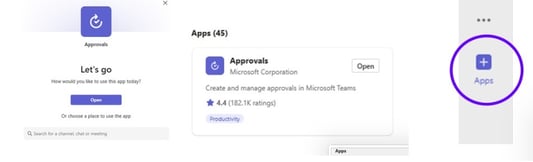
Step 2: Create a New Approval
- Click New approval request.
- Choose Create an approval.
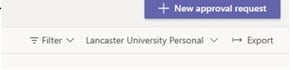
Step 3: Complete the Request Details
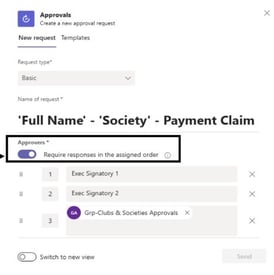
- Use a clear title format: Payment Request – [Group Name] – [Purpose].
- In the description include the full group/society name, what the payment is for, supplier name, amount (if known), and details of attached evidence.
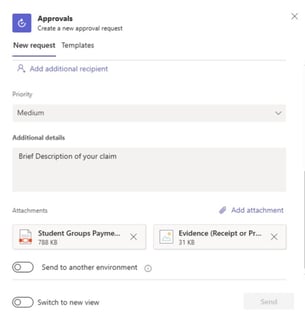
- Click on Approvers and click 'require responses in the assigned order'.
- Clearly reference any invoice, receipt or payment link.
- Important to note: All required responses must be in separate boxes and must end with the clubs and societies approvals or the payment will not go through.
Step 4: Attach Supporting Documents
- Attach invoices, receipts, quotations, order confirmations and payment links where applicable.

Step 5: Add the Required Approvers
- Add the authorised finance signatories for the group, usually the President and Treasurer.
- 'Grp-Clubs & Societies Approvals' MUST be added as the final approval stage.
- Suggested order: President → Treasurer → Grp-Clubs & Societies Approvals.
Step 6: Review and Submit
- Check all details are accurate and submit the approval request.
Mandatory Description Requirements
The description must clearly state:
- The full name of the Group or Society.
- Exactly what the payment or purchase is for.
- Supplier name and amount where applicable.
- Reference to attached invoice, receipt, quotation or payment link.
Example Description
Lancaster University Hiking Society is requesting payment of £350 to ABC Coaches Ltd for transport to the Yorkshire Dales trip. Please see attached invoice INV-12345 for processing.
Important
Requests will not reach LUSU Finance unless 'Grp-Clubs & Societies Approvals' is included as the final approval stage.
Timeline for payment processing
Payment requests and/or payment claims submitted via the approvals app with all the correct paperwork and approvals by 12:00pm (noon) on a Tuesday will be paid on Friday the same week. If the request comes through later or without neccessary approvals or documentation, this will be paid the following Friday.